

Problem
What needed to be clarified
Maintenance work involves different levels of responsibility. Management needs an overview, coordinators need to assign and monitor work, and crews need focused instructions and a practical way to report progress.
The interface needed to connect these perspectives while keeping responsibility and work-order status visible throughout the operational lifecycle.
Users and context
Who the product had to support
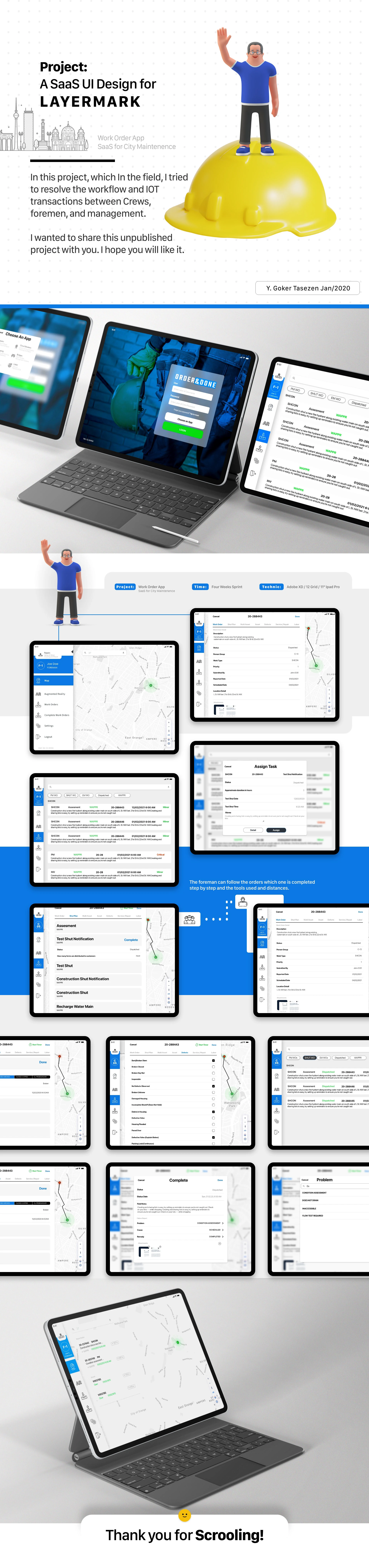
The source describes crews, foremen and management as the connected roles. The screens show map navigation, task assignment, work-order detail and step-by-step reporting flows.
Constraints
Limits kept visible
- Multiple operational roles with different information needs.
- Work orders moving through assignment, execution, reporting and closure.
- Location and asset context.
- The design work was not publicly released during the project period.
- An IoT reference exists in the source but is not technically defined.
Process
How the work moved forward
Model the work-order lifecycle
The product was structured around a sequence of reviewing an order, assigning responsibility, completing required steps, reporting status and closing or flagging the task.
Separate overview from field action
Maps and dashboards support operational awareness, while focused task views and guided forms reduce complexity when a user needs to complete a specific action.
Keep ownership visible
Assignment and team areas connect each task with the people responsible for it. Status treatments distinguish current, completed and problematic work.
Evidence
Evidence and inputs
The approved source visuals show work-order screens, map views, assignment panels, team areas, status displays and guided operational forms.
No measured field-validation, adoption or operational results are available for this retrospective case study.
- Yalcin worked on the project for approximately four months.
- The team worked in four-week sprint cycles; this cadence is separate from the total project duration.
- Design handoff and subsequent development are confirmed by Yalcin's project recollection.
Design decisions
Choices that shaped the interface
Design around the lifecycle
Representing work as a sequence creates continuity between management oversight, coordinator decisions and field execution.
Reduce forms into stages
Guided forms reduce the amount of information presented at one time and create a clearer order for assessment, updates and completion reporting.
Make responsibility and status visible
Assignment, teams and status indicators help users understand who owns the task, where it sits and what needs attention.
Outcome
What the work produced
Across approximately four months, the work produced a delivered enterprise product design covering the central work-order journey across management and field roles.
After design handoff, the product was developed and sold by the delivery organisation. No measured usability, adoption or operational-efficiency results are available for this case study.
Learning and next steps
What the next pass should test
Role-based products need continuity between overview, responsibility and field action. Each role needs enough context to act without carrying the full complexity of every other role.
- Validate the workflow with crews, foremen and managers.
- Confirm offline needs, device constraints and missing task states.
- Clarify the IoT reference before making any technical integration claim.